
Detect outliers using the Tukey IQR rule and visualize results
Source:R/IQROutliers.R
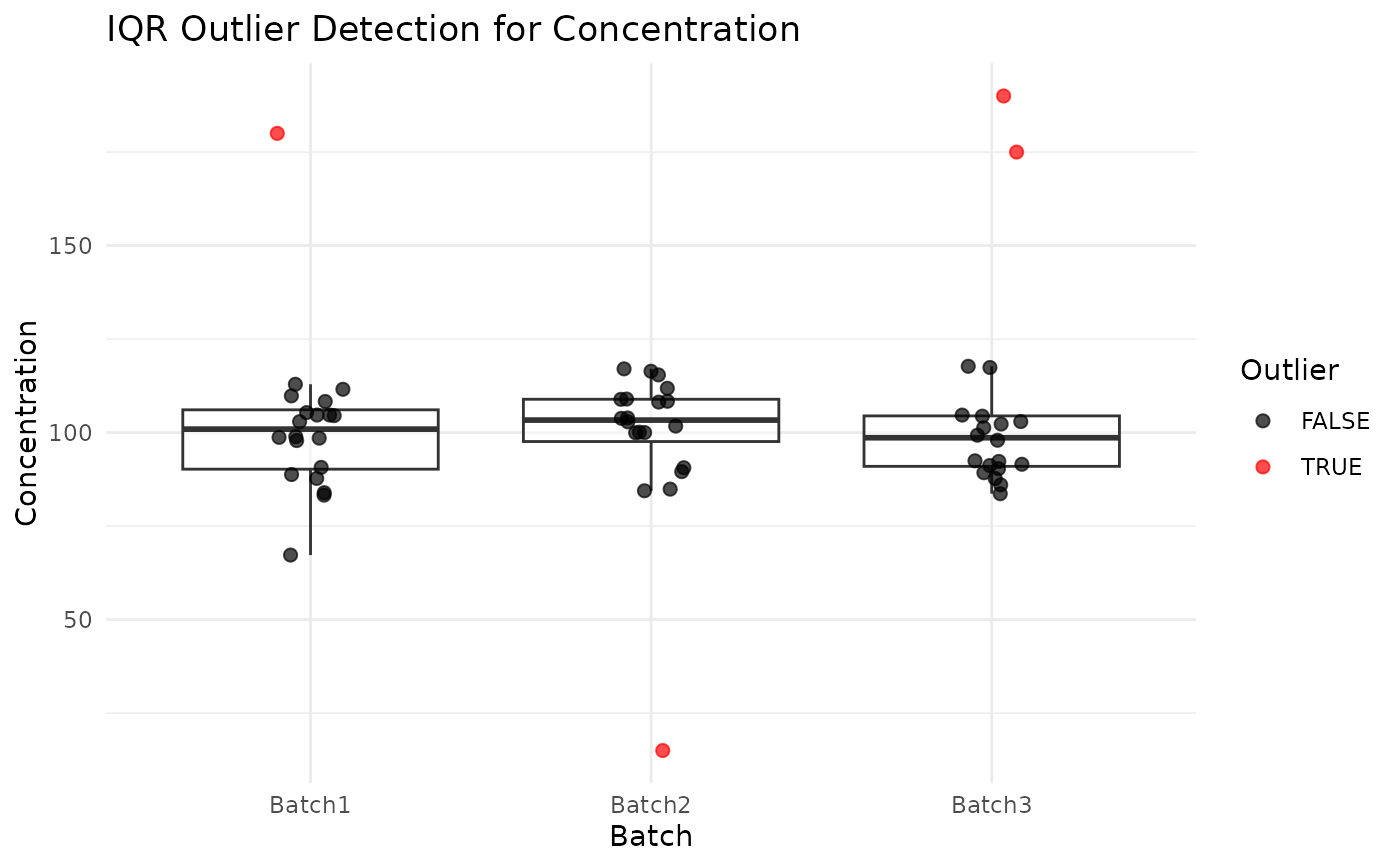
IQROutliers.RdThis function identifies potential outliers in a numeric variable using the Tukey interquartile range (IQR) rule (Tukey, 1977). It returns a tibble of the detected outlier rows and a ggplot visualization showing the variable across groups with outlier points highlighted.
Usage
IQROutliers(
  data,
  Variable,
  id_var = NULL,
  group = NULL,
  df = lifecycle::deprecated(),
  id = lifecycle::deprecated()
)
Arguments
- data
A data frame or tibble containing the variable to evaluate.
- Variable
A string specifying the name of the numeric variable to test.
- id_var
A string specifying the identifier column to include in the returned outlier table. If
NULL, no ID column is included in the returned table. Defaults toNULL.- group
A string specifying the grouping or batch column to use on the x-axis of the diagnostic plot. If
NULL, the function will produce a single combined boxplot across all rows. Defaults toNULL.- df
Deprecated (since 19.15.0). Use
datainstead.- id
Deprecated (since 19.15.0). Use
id_varinstead.
Value
A list with two elements:
outlierdf: a tibble containing only rows flagged as outliers, including the ID (when requested), variable, group (when requested), and outlier flag.p: a ggplot2 object showing a boxplot and jittered points colored by outlier status.
Details
The outlier rule is defined as: $$value < Q1 - 1.5 * IQR \; \textrm{or} \; value > Q3 + 1.5 * IQR$$
Outliers are visually highlighted using jittered points colored red, while the boxplot remains uncolored to prevent creation of a separate outlier-only box.
The color aesthetic is mapped only within geom_jitter(), ensuring the
boxplot is drawn once per group rather than once per outlier class. Missing
values are ignored when computing quartiles. If id or group are
provided they must be present in the input data frame.
Examples
# Synthetic assay data with a few extreme values injected into each batch
set.seed(2024)
lab_data <- data.frame(
SampleID = paste0("S", 1:60),
Batch = rep(c("Batch1", "Batch2", "Batch3"), each = 20),
Concentration = c(
rnorm(19, 100, 10), 180, # Batch1: one high outlier
rnorm(19, 105, 10), 15, # Batch2: one low outlier
rnorm(18, 98, 10), 175, 190 # Batch3: two high outliers
)
)
# Flag outliers within each batch
result <- IQROutliers(lab_data, "Concentration",
id_var = "SampleID", group = "Batch")
result$outlierdf
#> SampleID Concentration Batch outlier
#> 1 S20 180 Batch1 TRUE
#> 2 S40 15 Batch2 TRUE
#> 3 S59 175 Batch3 TRUE
#> 4 S60 190 Batch3 TRUE
# Display the diagnostic plot (flagged outliers shown in red)
result$p
 # Without a grouping variable (single combined boxplot)
result_all <- IQROutliers(lab_data, "Concentration",
id_var = "SampleID", group = NULL)
result_all$outlierdf
#> SampleID Concentration outlier
#> 1 S20 180 TRUE
#> 2 S40 15 TRUE
#> 3 S59 175 TRUE
#> 4 S60 190 TRUE
# Without a grouping variable (single combined boxplot)
result_all <- IQROutliers(lab_data, "Concentration",
id_var = "SampleID", group = NULL)
result_all$outlierdf
#> SampleID Concentration outlier
#> 1 S20 180 TRUE
#> 2 S40 15 TRUE
#> 3 S59 175 TRUE
#> 4 S60 190 TRUE