
Merging datasets is where many analysis errors are born: silently
duplicated rows, IDs that never match, and .x /
.y column pairs that nobody resolves. The damage is quiet —
a join that duplicates rows inflates your sample without error, and the
analysis that follows is wrong in a way no downstream check will
catch.
SciDataReportR wraps the merge-and-audit cycle into a small workflow:
-
safe_merge()performs a left join (exact-key or closest-time) and immediately audits the result withValidateMerge(). -
merge_detail()prints plain-text diagnostic tables for one merge. -
PlotMergeValidation()draws the same diagnostics as figures. -
ExploreMergeValidation()renders an interactive dashboard for one merge. -
merge_summary_table()stacks the one-row logs from many merges into a pipeline-level rollup.
The workflow
Every merge goes through the same four steps. The point of the workflow is that step 2 is never skipped, and that the answer is written down rather than eyeballed.
1. State what you expect before merging.
expected_relationship is the argument that turns an
assumption into a check. If you believe each left-hand row matches at
most one right-hand row, say "many-to-one"; the audit then
compares that against what actually happened instead of leaving you to
notice.
2. Merge and audit in one call.
safe_merge() joins and validates together, so an unaudited
merge is not something you can produce by forgetting a line.
3. Read the log, then drill into whatever it flags.
The one-row $log is the verdict;
merge_detail(), PlotMergeValidation(), and
ExploreMergeValidation() are three views of the same
underlying $validation object, for three different
situations.
4. Roll the logs up at the end.
merge_summary_table(..., flagged_only = TRUE) over every
merge in the pipeline is the gate: an empty table means every merge
passed.
What to check, and what it means
| Check | The question it answers | When to worry |
|---|---|---|
Row count (RowsBefore /
RowsAfter) |
Did the join duplicate rows? | Any increase you did not intend. This is the silent killer: no error, larger sample, wrong analysis |
Relationship
(DetectedRelationship) |
Was the join one-to-one, many-to-one, one-to-many? | It disagrees with expected_relationship
|
Match rate (MatchRate) |
What fraction of left-hand keys found a match? | Below what the study design implies — a low rate usually means a key-format problem, not genuinely absent data |
Key types (KeyHarmonization) |
Were the keys the same type on both sides? | IDs stored as integer in one file and double or character in another; coercion happened, so check it was the coercion you wanted |
Duplicate keys
(DuplicateKeyGroups) |
Does the key uniquely identify a row after merging? | Depends entirely on intent: fatal for one-row-per-participant data, expected for longitudinal data |
Unresolved duplicate variables
(UnresolvedDupVars) |
Did the merge leave .x / .y column
pairs? |
Always. Every one is a column whose correct value nobody has decided on |
| Value conflicts | Where a variable came from both sources, do they agree? | Disagreement means the two sources disagree about a fact; find out which is right before analyzing either |
Choosing a review surface
The three review functions read the same $validation
object and differ only in how they present it:
| Function | Output | Reach for it when |
|---|---|---|
merge_detail() |
Static knitr::kable() tables |
The merge is part of a rendered report or log, and the record needs to survive in the document |
PlotMergeValidation() |
ggplot figures | Coverage and conflict patterns matter more than exact counts, or the result is going in a slide |
ExploreMergeValidation() |
Interactive HTML dashboard | You are working through a problem merge yourself and want to expand, sort, and filter rather than re-run code |
For a merge that passes, the $log alone is enough and
none of the three is needed.
Example 1: a real longitudinal merge (survival::pbc + pbcseq)
The survival package ships two related datasets from the
Mayo Clinic primary biliary cholangitis trial:
-
pbc: baseline data, one row per patient (418 patients, including 106 who did not participate in the randomized trial), -
pbcseq: longitudinal follow-up labs, multiple rows per patient (only the 312 trial participants).
Merging them by patient id is a completely ordinary task
— and it surfaces real coverage gaps and duplicate-key situations that
were not staged for this vignette.
pbc_baseline <- pbc[, c("id", "age", "sex", "trt", "stage")]
pbc_labs <- pbcseq[, c("id", "day", "bili", "albumin", "platelet")]

m_pbc <- safe_merge(
  pbc_baseline,
  pbc_labs,
  by = "id",
  name = "pbc baseline + follow-up labs"
)
safe_merge() returns four elements and prints nothing on
its own. The one-row log is the pipeline-friendly view:
m_pbc$log
#> # A tibble: 1 × 27
#>   Merge        Status ReadyForAnalysis RowsBefore RowsAfter ColsBefore ColsAfter
#>   <chr>        <chr>  <lgl>                 <int>     <int>      <int>     <int>
#> 1 pbc baselin… FAIL   FALSE                   418      2051          5         9
#> # ℹ 20 more variables: ExpectedColsAdded <int>, ActualColsAdded <int>,
#> #   ExpectedRelationship <chr>, DetectedRelationship <chr>,
#> #   RelationshipMatchesExpected <lgl>, MatchedKeys <int>, LeftUniqueKeys <int>,
#> #   MatchRate <dbl>, DuplicateKeyBlockers <int>, DuplicateKeyGroups_Left <int>,
#> #   DuplicateKeyGroups_Right <int>, DuplicateKeyGroups_Merged <int>,
#> #   DuplicateKeyGroups <int>, UnresolvedDupVars <int>,
#> #   NewUnresolvedDupVars <int>, InheritedUnresolvedDupVars <int>, …
The summary element is a ready-made
knitr::kable():
m_pbc$summary| Metric | Value |
|---|---|
| Status | FAIL |
| Rows (before -> after) | 418 -> 2051 |
| Columns (before -> after) | 5 -> 9 |
| Columns added (expected vs actual) | expected +4; actual +4 |
| Expected relationship | one-to-one |
| Detected relationship | one-to-many |
| Relationship matches expected | FALSE |
| Keys matched | 312 / 418 |
| Match rate | 74.6% |
| Duplicate key blockers | 570 |
| Duplicate key groups left/right/merged | 0 / 285 / 285 |
| Unresolved duplicate variables before merge | 0 |
| Unresolved duplicate variables after merge | 0 |
| New unresolved duplicate variables | 0 |
| Inherited unresolved duplicate variables | 0 |
| Overlapping variables before merge | 0 |
| Key harmonization | Key types already compatible. |
| Duplicate variable note | No unresolved duplicate variable pairs detected. |
| Note | Rows changed after merge, but expected_relationship should preserve left-side row count. |
The audit correctly reports this merge as FAIL — not
because the code is wrong, but because the result needs a decision from
you before analysis:
- Coverage: 106 patients exist only in the baseline data (the non-trial patients who have no follow-up labs).
-
Duplicate keys:
pbcseqhas many rows per patient, soidalone does not uniquely identify a row after the merge. If you intended a one-row-per- patient dataset, this is a genuine error; if you intended a longitudinal dataset, you now have written confirmation of what happened.
Drilling in with merge_detail()
merge_detail() prints plain kable tables for the checks,
the unmatched keys on each side, overlapping variables, and suspicious
conflicts, skipping any empty section. In R Markdown, use a chunk with
results = "asis":
merge_detail(m_pbc, TopN = 5)| Check | Count | Status | Details |
|---|---|---|---|
| Key Types | 0.000 | PASS | Key storage classes match across datasets. |
| Missing Keys | 0.000 | PASS | No missing key rows detected. |
| Expected Relationship | 570.000 | FAIL | Detected relationship is one-to-many, but expected_relationship = ‘one-to-one’. Duplicate key blockers: 570. |
| Duplicate Keys | 570.000 | FAIL | Duplicate complete key combinations violate the expected relationship. |
| Coverage | 106.000 | WARNING | Some complete key combinations appear only in one source dataset. |
| Row Count | 1.000 | FAIL | MergedData row count changed even though the expected relationship should preserve left-side row count. |
| Row Inflation | 1.054 | WARNING | MergedData has more rows than expected. Review whether row multiplication was intentional. |
| Overlapping Variables | 0.000 | PASS | No non-key variables overlap across source datasets. |
| Unresolved Duplicate Variables | 0.000 | PASS | No unresolved duplicate variable pairs detected. |
| Variable Conflicts | 0.000 | PASS | No duplicated-variable value conflicts detected. |
| Suspicious Conflicts | 0.000 | PASS | No low-agreement or class-mismatched duplicated variables detected. |
| Merge Readiness | 1.000 | FAIL | Major merge-integrity blockers detected. Review failed checks. |
| id |
|---|
| 313 |
| 314 |
| 315 |
| 316 |
| 317 |
A closest-time variant
Suppose instead you want a one-row-per-patient dataset containing the
lab draw closest to enrollment.
safe_merge(method = "closest_time") calls
Merge_ByClosestTime() under the hood, matching on
id exactly and picking the pbc_labs row whose
day is nearest to each baseline row’s time (enrollment is
day 0 here).
pbc_enroll <- pbc_baseline
pbc_enroll$enroll_day <- 0

m_closest <- safe_merge(
  pbc_enroll,
  pbc_labs,
  by = "id",
  name = "closest lab to enrollment",
  method = "closest_time",
  time_var_before = "enroll_day",
  time_var_add = "day"
)

m_closest$log
#> # A tibble: 1 × 27
#>   Merge        Status ReadyForAnalysis RowsBefore RowsAfter ColsBefore ColsAfter
#>   <chr>        <chr>  <lgl>                 <int>     <int>      <int>     <int>
#> 1 closest lab… FAIL   FALSE                   418       418          6        10
#> # ℹ 20 more variables: ExpectedColsAdded <int>, ActualColsAdded <int>,
#> #   ExpectedRelationship <chr>, DetectedRelationship <chr>,
#> #   RelationshipMatchesExpected <lgl>, MatchedKeys <int>, LeftUniqueKeys <int>,
#> #   MatchRate <dbl>, DuplicateKeyBlockers <int>, DuplicateKeyGroups_Left <int>,
#> #   DuplicateKeyGroups_Right <int>, DuplicateKeyGroups_Merged <int>,
#> #   DuplicateKeyGroups <int>, UnresolvedDupVars <int>,
#> #   NewUnresolvedDupVars <int>, InheritedUnresolvedDupVars <int>, …
Note the caveat: ValidateMerge() audits duplicate keys
using by alone (here id), not the time
variables. In longitudinal settings, repeated keys in the lab data are
legitimate repeated visits, so a duplicate-key FAIL from a
closest-time merge may reflect expected repetition rather than a merge
error. The validation output is deliberately left as-is — read it with
that caveat in mind (here, the merged data itself has one row per
patient, which you can confirm from RowsBefore and
RowsAfter).
Example 2: a synthetic merge that fails every check
To demonstrate the remaining check types — key-type mismatches,
unresolved .x / .y pairs, and value conflicts
— here is a small synthetic pair of data frames constructed to go wrong
in all the classic ways: a duplicated key, an ID stored as integer on
one side and double on the other, IDs missing from each side, and a
sex column present in both sources with disagreeing
values.
demographics <- data.frame(
  id = 1:6, # integer
  sex = c("F", "M", "F", "F", "M", "F"),
  age = c(54, 61, 47, 66, 58, 50)
)

device_data <- data.frame(
  id = c(1, 2, 2, 5, 7), # double, with id 2 duplicated
  sex = c("F", "F", "M", "M", "F"), # disagrees with demographics for id 2/5
  score = c(0.82, 0.75, 0.71, 0.64, 0.90)
)

m_synth <- safe_merge(
  demographics,
  device_data,
  by = "id",
  name = "demographics + device data"
)

m_synth$log
#> # A tibble: 1 × 27
#>   Merge        Status ReadyForAnalysis RowsBefore RowsAfter ColsBefore ColsAfter
#>   <chr>        <chr>  <lgl>                 <int>     <int>      <int>     <int>
#> 1 demographic… FAIL   FALSE                     6         7          3         5
#> # ℹ 20 more variables: ExpectedColsAdded <int>, ActualColsAdded <int>,
#> #   ExpectedRelationship <chr>, DetectedRelationship <chr>,
#> #   RelationshipMatchesExpected <lgl>, MatchedKeys <int>, LeftUniqueKeys <int>,
#> #   MatchRate <dbl>, DuplicateKeyBlockers <int>, DuplicateKeyGroups_Left <int>,
#> #   DuplicateKeyGroups_Right <int>, DuplicateKeyGroups_Merged <int>,
#> #   DuplicateKeyGroups <int>, UnresolvedDupVars <int>,
#> #   NewUnresolvedDupVars <int>, InheritedUnresolvedDupVars <int>, …
m_synth$summary| Metric | Value |
|---|---|
| Status | FAIL |
| Rows (before -> after) | 6 -> 7 |
| Columns (before -> after) | 3 -> 5 |
| Columns added (expected vs actual) | expected +2; actual +2 |
| Expected relationship | one-to-one |
| Detected relationship | one-to-many |
| Relationship matches expected | FALSE |
| Keys matched | 3 / 6 |
| Match rate | 50% |
| Duplicate key blockers | 2 |
| Duplicate key groups left/right/merged | 0 / 1 / 1 |
| Unresolved duplicate variables before merge | 0 |
| Unresolved duplicate variables after merge | 1 |
| New unresolved duplicate variables | 1 |
| Inherited unresolved duplicate variables | 0 |
| Overlapping variables before merge | 1 |
| Key harmonization | id: integer / numeric -> numeric |
| Duplicate variable note | Merged data contains 1 new unresolved duplicate variable pair(s) introduced by this merge. |
| Note | Rows changed after merge, but expected_relationship should preserve left-side row count. |
Every check type in ValidateMerge() now has something to
say: the duplicate key and the unresolved sex.x /
sex.y pair are integrity blockers (FAIL),
while key-type coercion, coverage gaps, row inflation, overlapping
variables, and value conflicts appear as warnings.
merge_detail(m_synth)| Check | Count | Status | Details |
|---|---|---|---|
| Key Types | 0.000 | PASS | Key storage classes match across datasets. |
| Missing Keys | 0.000 | PASS | No missing key rows detected. |
| Expected Relationship | 2.000 | FAIL | Detected relationship is one-to-many, but expected_relationship = ‘one-to-one’. Duplicate key blockers: 2. |
| Duplicate Keys | 2.000 | FAIL | Duplicate complete key combinations violate the expected relationship. |
| Coverage | 4.000 | WARNING | Some complete key combinations appear only in one source dataset. |
| Row Count | 1.000 | FAIL | MergedData row count changed even though the expected relationship should preserve left-side row count. |
| Row Inflation | 1.167 | WARNING | MergedData has more rows than expected. Review whether row multiplication was intentional. |
| Overlapping Variables | 1.000 | WARNING | Variables appear in both source datasets but were not specified as keys. |
| Unresolved Duplicate Variables | 1.000 | FAIL | MergedData still contains unresolved .x/.y or _x/_y variable pairs. |
| Variable Conflicts | 4.000 | WARNING | At least one duplicated variable pair contains conflicting values. |
| Suspicious Conflicts | 1.000 | WARNING | At least one duplicated variable has low agreement or mismatched classes. |
| Merge Readiness | 1.000 | FAIL | Major merge-integrity blockers detected. Review failed checks. |
| id |
|---|
| 3 |
| 4 |
| 6 |
| id |
|---|
| 7 |
| Variable |
|---|
| sex |
| Variable | XVariable | YVariable | LeftClass | RightClass | Agreement | Conflicts | MissingnessConflicts | BothMissing | TotalRows |
|---|---|---|---|---|---|---|---|---|---|
| sex | sex.x | sex.y | character | character | 42.86 | 4 | 3 | 0 | 7 |
The same merge as figures
PlotMergeValidation() renders the identical diagnostics
as ggplot figures. Plot = "All" returns them as a named
list, so a report can include only the ones that matter for the merge at
hand.
plots_synth <- PlotMergeValidation(
  m_synth$validation,
  Plot = "All",
  interactive = FALSE
)
names(plots_synth)
#> [1] "Checks"    "Coverage"  "JoinAudit" "Agreement" "Conflicts"
The checks figure is the plotted form of the same traffic-light table
that merge_detail() prints first:
plots_synth$Checks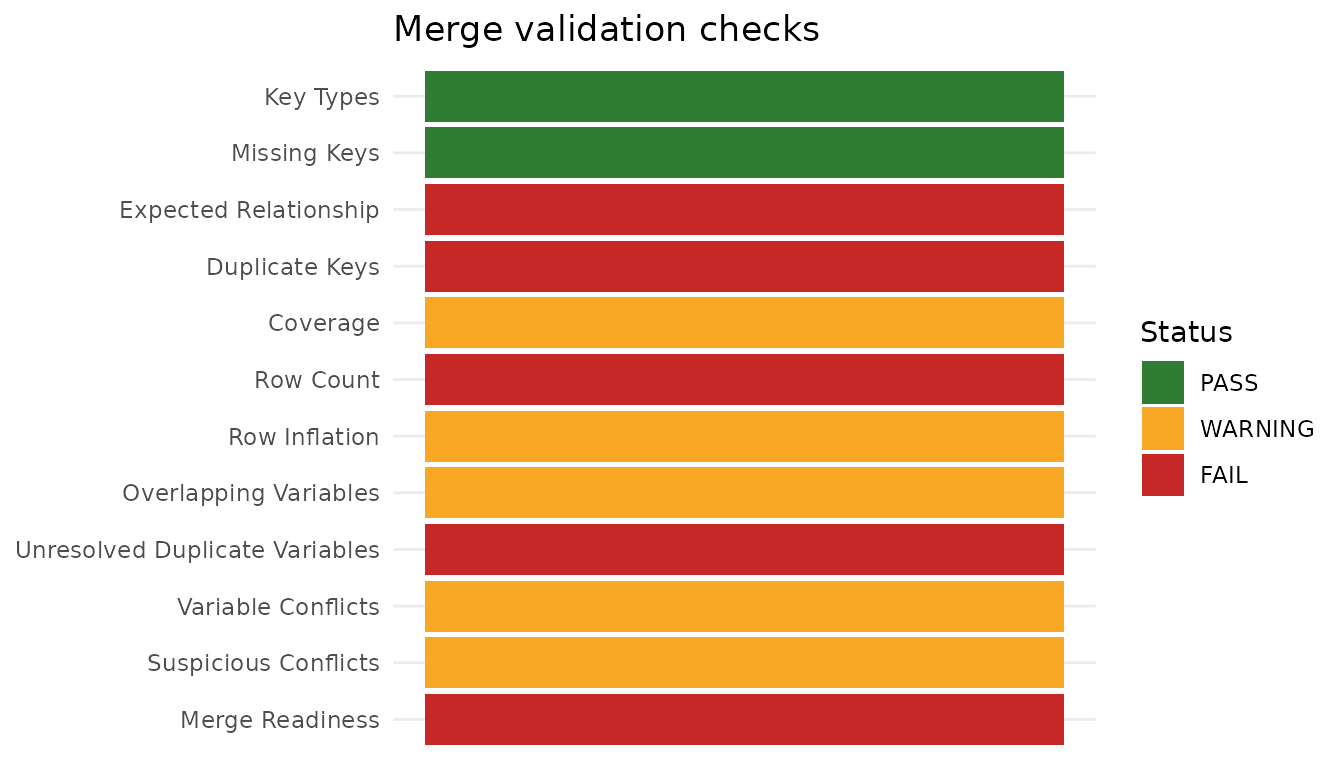
Coverage shows where the keys came from — matched on both sides, or present in only one. A pattern here is often more diagnostic than the counts: keys missing from one side in a block usually points at a formatting or provenance problem rather than genuinely absent records.
plots_synth$Coverage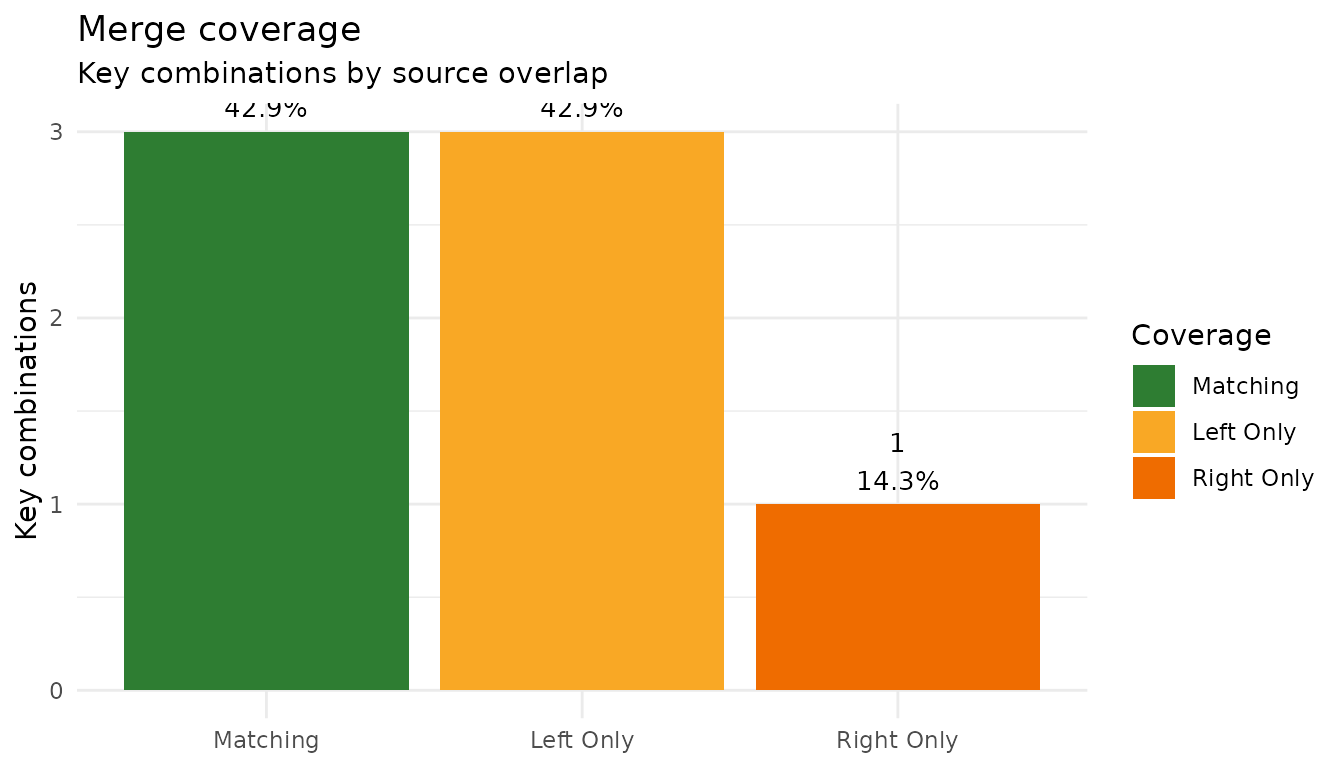
Interactive review with ExploreMergeValidation()
For interactive QC sessions, pass the validation element
to ExploreMergeValidation(). This is the same content
again, but explorable: the default Detail = "Compact" keeps
the checks table front and center, with the coverage and conflict
explorers as click-to-expand accordion sections labeled with their item
counts. Use Detail = "Full" to render them expanded.
Use this one while you are still working out what went
wrong; use merge_detail() once you know, and need the
answer written into a report.
ExploreMergeValidation(
  m_synth$validation,
  Title = "Demographics + device data",
  Detail = "Compact"
)Coverage explorer (4 unmatched)
Duplicate-variable conflicts (1 variable)
Pipeline rollup with merge_summary_table()
After a sequence of merges, stack the logs into a single table. With
flagged_only = TRUE, only merges whose worst check status
is not PASS remain — an end-of-pipeline QC gate:
merge_summary_table(
  list(m_pbc$log, m_closest$log, m_synth$log),
  flagged_only = TRUE
)
#> # A tibble: 3 × 27
#>   Merge        Status ReadyForAnalysis RowsBefore RowsAfter ColsBefore ColsAfter
#>   <chr>        <chr>  <lgl>                 <int>     <int>      <int>     <int>
#> 1 pbc baselin… FAIL   FALSE                   418      2051          5         9
#> 2 closest lab… FAIL   FALSE                   418       418          6        10
#> 3 demographic… FAIL   FALSE                     6         7          3         5
#> # ℹ 20 more variables: ExpectedColsAdded <int>, ActualColsAdded <int>,
#> #   ExpectedRelationship <chr>, DetectedRelationship <chr>,
#> #   RelationshipMatchesExpected <lgl>, MatchedKeys <int>, LeftUniqueKeys <int>,
#> #   MatchRate <dbl>, DuplicateKeyBlockers <int>, DuplicateKeyGroups_Left <int>,
#> #   DuplicateKeyGroups_Right <int>, DuplicateKeyGroups_Merged <int>,
#> #   DuplicateKeyGroups <int>, UnresolvedDupVars <int>,
#> #   NewUnresolvedDupVars <int>, InheritedUnresolvedDupVars <int>, …
An empty table here would mean every merge in the pipeline passed cleanly; any row that appears is a merge that still needs review before analysis.
Stating the expectation up front
The single highest-value habit in this workflow is declaring
expected_relationship before the merge runs. Without it,
the audit can report what happened but not whether that was what you
wanted:
m_declared <- safe_merge(
  pbc_baseline,
  pbc_labs,
  by = "id",
  name = "pbc, declared as many-to-one",
  expected_relationship = "many-to-one"
)

m_declared$log[, c(
  "ExpectedRelationship", "DetectedRelationship",
  "RelationshipMatchesExpected"
)]
#> # A tibble: 1 × 3
#>   ExpectedRelationship DetectedRelationship RelationshipMatchesExpected
#>   <chr>                <chr>                <lgl>
#> 1 many-to-one          one-to-many          FALSE
Here the declaration is wrong and the audit says so:
pbcseq has many rows per patient, so the join is
one-to-many, not many-to-one. That mismatch is exactly the signal worth
having — it is the difference between a longitudinal dataset you meant
to build and a baseline dataset you have accidentally duplicated.
Summary
- Declare
expected_relationshipbefore merging. - Merge with
safe_merge(), which audits in the same call. - Read
$log. If it isPASS, move on. - If not, drill in with
merge_detail()for a report,PlotMergeValidation()for the pattern, orExploreMergeValidation()to investigate interactively. - Gate the pipeline with
merge_summary_table(logs, flagged_only = TRUE).
A FAIL is not necessarily a bug. It means the merge
produced something that needs a decision from you — and the value of the
workflow is that the decision is recorded rather than assumed.